Book lists connection information
Portfolio connects to a specific book lists server to display bestseller lists from different publications and, for Symphony users, custom book lists. Figure 4-1 below describes the connections needed to display book lists in Enterprise and should help you configure your system correctly:
Figure 4-1:
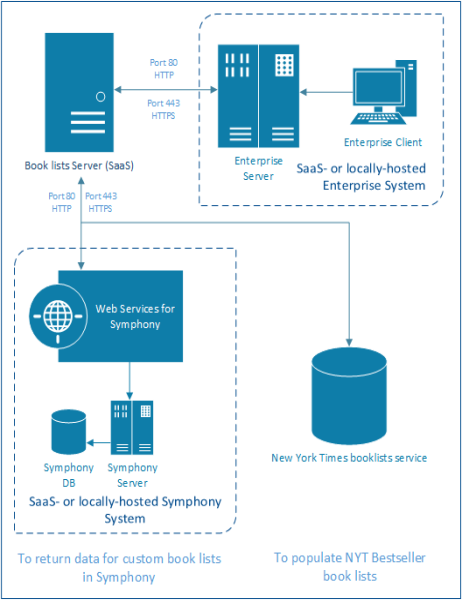

The communication between Enterprise, the book lists server, and Symphony is done over http/https and via the usual ports (80, 443).
Displaying bestseller lists
The setup described above goes through the following process to display a bestseller list from a particular publication:
|
•
|
The book lists server queries publication sources like the New York Times several times a day. |
|
•
|
The book lists server stores the results it receives for each query. |
|
•
|
When a user makes a request for one of these bestseller lists, Enterprise directs the request to the book lists server. |
|
•
|
The server returns the results of its most recent query to the publications bestseller list service. |
|
•
|
Enterprise displays those results in the book list and/or book river. |
Displaying custom lists for Symphony
The setup described above goes through the following process to display a custom Symphony book list:
|
•
|
An Enterprise user inputs information that points to a custom book list that has been created in Symphony. |
|
•
|
Enterprise builds a request containing the information about the Symphony book list and sends the request to the book lists server. |
|
•
|
The book lists server gets the custom book list from Symphony. |
|
•
|
After getting the custom book list, the book list server normalizes the data and sends the information back to Enterprise. |
For more information, see these topics:
© 2008, 2016 SirsiDynix